
by Eli Fulton | Dec 22, 2025 | Managed Software IT Consulting Services |

Most people do not think about office IT until something stops working.
Then a five-minute issue turns into half an hour. Someone cannot open a shared folder. Another person loses internet access. A meeting gets delayed because the conference room computer refuses to connect.
If that sounds familiar, the problem may be bigger than one bad laptop. An IT support company can help sort out recurring issues before they keep interrupting the workday.
Table of Contents
Frequent IT Downtime Disrupts Business
A computer freezing once is not unusual. The same thing happening every few days is worth looking into.
The same goes for Wi-Fi. One short outage may not matter much. Repeated outages can stop calls, cloud programs, file access, and other everyday work.
Common complaints may include:
- Computers freezing for no clear reason
- Wi-Fi is dropping in certain rooms.
- Shared drives disappearing
- Programs are taking too long to load
- Routers needing frequent restarts
Sometimes staff get used to these problems and work around them.
That does not mean the problem has gone away.
An IT technician can check the network, devices, software, and settings together. That often makes more sense than fixing the same symptom each time it appears.
Lack of In-House IT Expertise from an IT Support Company
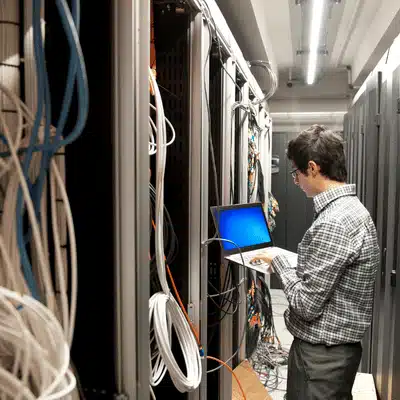
There is often one person in the office who gets every computer question.
They may know how to reconnect the printer or get the Wi-Fi working again. Before long, they are also being asked about backups, passwords, software, and security.
That is a lot to place on someone whose actual job is something else.
Outside IT help may be useful when:
- Staff regularly stop working to solve tech problems.
- Nobody checks the backups.
- The same issue keeps coming back.
- New employees struggle to get set up.
- No one knows who should handle an urgent IT problem.
A business IT support provider can bring in help when the issue goes beyond a simple restart.
One day, the problem may be a laptop. The next could be user permissions, a cloud account, or the office network.
Security Risks Keep Growing
Not every security problem starts with a sophisticated attack.
It can start with an email that looks like it came from a supplier. Someone clicks the link and enters a password. That may be enough to expose an account.
Verizon’s 2025 Data Breach Investigations Report found ransomware in 88% of breaches involving small and midsize organizations.
Some things are worth checking around the office:
- Are passwords being shared?
- Do former employees still have active accounts?
- Are computers behind on updates?
- Has anyone tested the backups recently?
- Are phishing emails common?
- Does anyone review unusual logins?
If the answer to several of these is unclear, security deserves attention.
An IT company can help review access, update devices, improve backup practices, and tighten account security.
None of those steps makes a business completely safe. They do make common weaknesses easier to find and fix.
Unpredictable IT Costs and Surprise Fix Bills
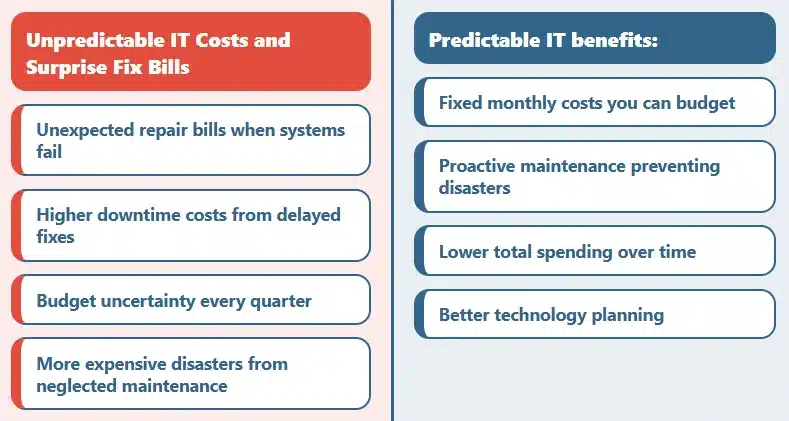
Paying for IT only when something breaks sounds simple.
Sometimes it is.
If a company has very few problems, calling a technician as needed may work fine. Trouble starts when the calls become frequent.
One broken device can lead to several expenses at the same time:
- Technician fees
- Replacement equipment
- Lost work hours
- Data recovery
- Emergency setup work
- Extra labor
Managed IT works differently.
The business pays for an agreed level of ongoing support. Depending on the plan, that could include maintenance, updates, monitoring, troubleshooting, or security work.
Do not look at the monthly price alone.
Ask:
- What is included?
- What costs extra?
- Are urgent calls covered?
- Are software licenses separate?
- How are projects billed?
Two plans with similar prices may cover very different things.
Your Technology Is Outdated
Old office equipment rarely announces that it is outdated.
It usually gives smaller clues first.
A computer takes forever to start. A program cannot install its latest update. The Wi-Fi works near the router but barely reaches the other side of the building.
You may want an IT review if the office has:
- Computers that have become noticeably slow
- Older servers are still handling important work.
- Software that no longer receives updates
- Weak Wi-Fi coverage
- Backup drives nobody has tested
This does not mean buying a whole new office full of equipment.
Some systems may still be fine.
An IT provider can help identify what needs attention now and what can stay in use longer.
Business Growth is Straining Your IT

Adding staff also adds technology work.
A new employee needs more than a desk and a computer. They may need an email account, software, passwords, access to shared files, security settings, and backup coverage.
A second location creates even more moving parts.
Growing businesses may need help with:
- Setting up computers
- Creating new accounts
- Managing permissions
- Improving Wi-Fi coverage
- Setting up guest networks
- Connecting more than one office
- Adding storage
- Expanding backups
It is useful to know what you already have before adding more.
A simple list of computers, software, accounts, network equipment, and key services can save time when an IT company begins reviewing the setup.
How much does an IT support company cost?
There is no single price. A small office with a few computers will not have the same needs as a company with several locations. Providers may charge hourly, monthly, or by project. Ask for a written quote so you can see what is included and what is not.
What’s the difference between break-fix and managed IT support?
Break-fix means getting help when something has already gone wrong. You call a technician and pay for that job. Managed IT is an ongoing arrangement. The provider may handle maintenance, updates, troubleshooting, monitoring, and other work listed in the agreement.
How quickly can an IT support company respond to emergencies?
That varies. A full network outage may be treated as more urgent than one employee having trouble with a program. Ask how the provider handles emergencies and whether the contract lists response times.
Can a small business afford professional IT support?
For some small businesses, outside IT support is easier to budget for than hiring a full-time employee. The comparison should include more than the monthly fee. Downtime, repeated repair bills, and staff time spent fixing technology also have a cost.
Will an IT support company work with my existing systems?
In many cases, yes. A provider will normally review what is already in place before suggesting replacements. Some older systems may still work well enough. Others may need to go if they no longer receive important updates or security support.
How do I choose the right IT support company?
Start with the problems your office actually has. Ask how the provider handles outages, backups, cybersecurity, on-site visits, and after-hours requests. Then read the service agreement carefully. Pay attention to fees, response times, and what happens if you cancel.
How to migrate to cloud tools with IT support?
First, figure out what needs to move. That may include files, email, programs, accounts, and user permissions. The IT team can prepare the new system, transfer the information, test it, and help staff get started. Keep a tested backup before changing the old setup.
What is included in a free IT assessment?
It depends on the provider. A review may include computers, network equipment, software, user accounts, backups, servers, and security settings. Down to Earth Technology provides IT consulting, network support, security, backup assistance, and other business technology services. Ask what the assessment covers before scheduling it.
How long does it take to transition to managed IT services?
A small office with a straightforward setup may be easier to move. A company with several locations, old hardware, or unresolved problems may need more preparation. The provider may first review devices, accounts, backups, software, and security.
Do you offer 24/7 helpdesk support?
That depends on the service plan. Down to Earth Technology offers managed IT, network support, security, backup, and troubleshooting services. Ask whether the plan includes nights, weekends, holidays, and emergency calls.
When computer problems start becoming normal, that is usually a sign that something needs attention. Contact Down to Earth Technology for a free IT assessment and find out which parts of your setup are causing the most trouble.